Architecture & Data Flow
Veris supports two execution modes that determine where your agent runs during simulations. Both modes use the same CLI, scenarios, graders, and evaluation pipeline — only the hosting boundary changes.
| Mode | Your agent runs on | Best for |
|---|---|---|
| Veris-hosted (default) | Veris cloud (GKE) | Getting started quickly, no infra to manage |
| Customer-hosted | Your own K8s cluster | Data residency, compliance, air-gapped environments |
Mode 1: Veris-Hosted (Default)
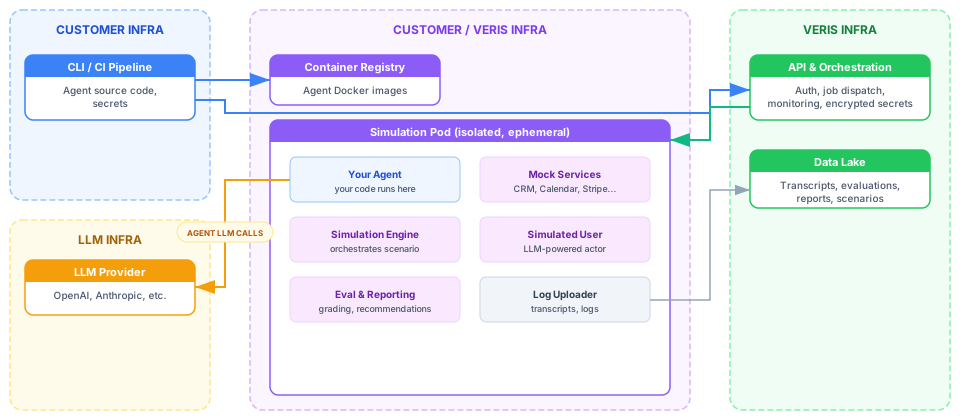
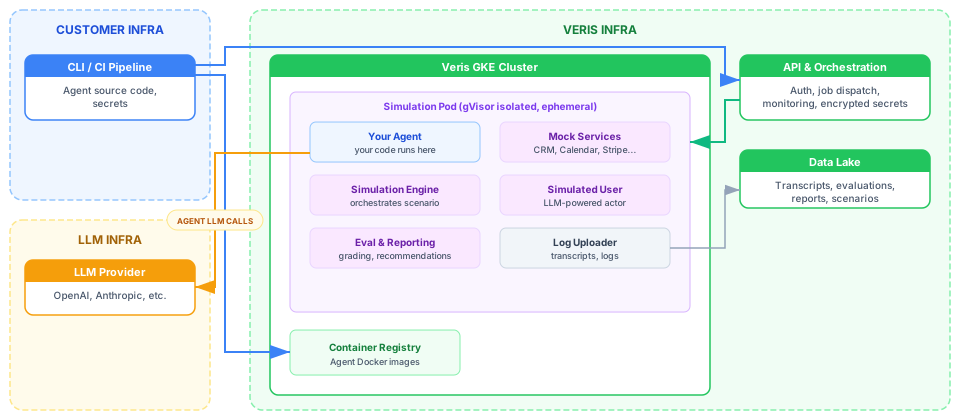
Your agent code is pushed to the Veris container registry and runs in an isolated pod on Veris-managed GKE infrastructure.
System Boundaries
Customer Infra — everything under your control:
- CLI / CI pipeline — runs on your machine or CI runner, pushes code and sends commands
- LLM provider — your agent’s LLM calls go directly to the provider using your own API keys
Customer / Veris Infra — your code running on Veris infrastructure:
- Simulation pod — an isolated, ephemeral container on Veris GKE with gVisor sandboxing. Contains your agent, mock services, simulated user, simulation engine, eval & reporting, and log uploader
Veris Infra — Veris-managed services:
- API & Orchestration — authentication, job dispatch, monitoring
- Data Lake — simulation transcripts, evaluations, reports, encrypted secrets
What’s Inside a Simulation Pod
Each pod is a self-contained simulation environment:
| Component | Role |
|---|---|
| Your agent | Your code, started via the entry_point defined in veris.yaml |
| Mock services | LLM-powered mocks for CRM, Calendar, Stripe, Jira, etc. |
| Simulated user | An LLM-powered actor that drives the conversation with your agent |
| Simulation engine | Orchestrates the scenario, manages turns, and records the transcript |
| Eval & reporting | Grading, root cause analysis, and actionable recommendations |
| Log uploader | Sidecar that streams logs and transcripts to the data lake |
Data Flow
Egress (you send):
| Data | How It’s Sent | Where It’s Stored |
|---|---|---|
| Docker image (agent code + dependencies) | veris env push | Veris Container Registry |
| veris.yaml (services, actor config, entry point) | Bundled in the Docker image | Veris Container Registry |
| Environment variables & secrets | veris env set KEY=VALUE --secret | Database, encrypted at rest (Fernet/AES) |
| Scenarios (test case definitions) | veris scenarios generate or manual upload | Database + Data Lake |
Ingress (you receive):
| Data | How It’s Retrieved |
|---|---|
| Simulation transcripts | CLI: veris simulations get / Console UI |
| Evaluation scores | CLI: veris evaluation-runs status / Console UI |
| Reports | CLI: veris reports get -o report.html / Console UI |
| Run status & metadata | CLI: veris run status / Console UI |
Security Model
| Concern | How It’s Handled |
|---|---|
| Code isolation | Each simulation runs in a gVisor-sandboxed container with no access to host or other tenants |
| Secrets at rest | Encrypted with Fernet (AES) in the database; decrypted only at pod creation time |
| Secrets in transit | All API communication over HTTPS/TLS |
| Network isolation | Pods have no access to Veris infrastructure; only outbound to LLM providers via customer keys |
| Ephemeral containers | Pods are destroyed after simulation completes; no persistent state |
Mode 2: Customer-Hosted
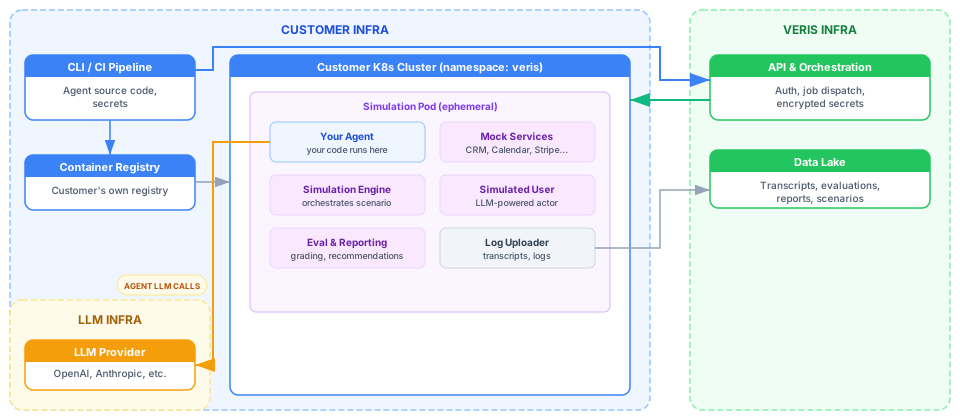
In customer-hosted mode, your agent code never leaves your infrastructure. The Veris backend connects to your Kubernetes cluster via the K8s API and creates simulation Jobs directly in a namespace you control.
How It Works
- You register your K8s cluster with Veris (API server URL, CA cert, bearer token)
- You set your environment’s
execution_modetocustomer_hosted - When you run simulations, the Veris backend creates Jobs, Secrets, and ConfigMaps on your cluster instead of Veris GKE
- The log uploader sidecar uses a short-lived GCS token (via service account impersonation) to upload transcripts back to Veris storage
- Evaluation, reporting, and all other pipeline steps work identically
System Boundaries
Customer Infra — everything runs on your side:
- CLI / CI pipeline — pushes code and sends commands
- K8s cluster — your own cluster where simulation pods run, in a dedicated
verisnamespace - Image registry — optionally push to your own container registry instead of Veris’s
- LLM provider — agent LLM calls stay within your network perimeter
Veris Infra — only orchestration and storage:
- API & Orchestration — dispatches jobs to your cluster via K8s API using a bearer token you provide
- Data Lake — receives transcripts via short-lived upload tokens
- Database — stores run metadata, scenarios, evaluations, encrypted secrets
Setup
1. Prepare your cluster
Create a namespace and service account with the required RBAC permissions:
apiVersion: v1
kind: Namespace
metadata:
  name: veris
---
apiVersion: v1
kind: ServiceAccount
metadata:
  name: veris-simulation
  namespace: veris
---
apiVersion: rbac.authorization.k8s.io/v1
kind: Role
metadata:
  name: veris-simulation
  namespace: veris
rules:
- apiGroups: ["batch"]
  resources: ["jobs"]
  verbs: ["create", "get", "list", "delete", "watch"]
- apiGroups: [""]
  resources: ["pods", "pods/log"]
  verbs: ["get", "list", "watch"]
- apiGroups: [""]
  resources: ["secrets", "configmaps"]
  verbs: ["create", "get", "delete", "list"]
- apiGroups: [""]
  resources: ["namespaces"]
  verbs: ["get"]
2. Register your cluster
veris clusters register \
  --name "my-production-cluster" \
  --provider gke \
  --api-server-url "https://<cluster-ip>" \
  --ca-certificate /path/to/ca.pem \
  --namespace veris \
  --token "<bearer-token>"
3. Test connectivity
veris clusters test <cluster-id>4. Set your environment to customer-hosted
veris env set-execution-mode customer_hosted --cluster <cluster-id>5. Push images to your own registry (optional)
veris env push --image us-docker.pkg.dev/my-project/repo/my-agent --tag v1This builds locally using the Veris base image, tags the output with your registry URI, and pushes using your existing Docker auth.
Data Flow
What stays on your infrastructure:
- Your agent source code and Docker image
- All simulation execution (pods run on your cluster)
- Agent LLM calls (never routed through Veris)
What goes to Veris:
- Simulation transcripts and logs (uploaded to GCS via short-lived tokens)
- Run metadata and status updates
- Encrypted secrets (stored in Veris DB, injected into your cluster as K8s Secrets at runtime)
What comes from Veris to your cluster:
- K8s Job definitions (created via K8s API)
- K8s Secrets and ConfigMaps (scenario config, environment variables)
- Short-lived GCS upload tokens for the log sidecar
In customer-hosted mode, simulation pods do not use gVisor since they run on your own infrastructure with your own security policies. You control the node pool, network policies, and resource limits.
Security Model
| Concern | How It’s Handled |
|---|---|
| Code residency | Agent code never leaves your infrastructure; images stay in your registry |
| Cluster access | Veris authenticates via a scoped bearer token with minimal RBAC permissions |
| Log upload | Short-lived GCS tokens via service account impersonation (no long-lived credentials on your cluster) |
| Secrets | Encrypted at rest in Veris DB; created as K8s Secrets on your cluster at job creation time |
| Network | Only outbound connection is from the log sidecar to GCS; all other traffic stays in your cluster |
Comparison
| Veris-Hosted | Customer-Hosted | |
|---|---|---|
| Agent runs on | Veris GKE (gVisor) | Your K8s cluster |
| Code leaves your infra | Yes (pushed to Veris registry) | No |
| Infrastructure to manage | None | K8s namespace + RBAC |
| Image registry | Veris Artifact Registry | Your own (optional) |
| Log upload | Workload Identity (automatic) | Short-lived GCS tokens |
| gVisor isolation | Yes | No (your cluster, your policies) |
| Setup time | Minutes | ~30 minutes |
How DNS Interception Works
Regardless of hosting mode, your agent’s API calls are intercepted transparently — no code changes needed:
- You declare
dns_aliasesinveris.yaml(e.g.,www.googleapis.comfor the Calendar service) - At pod startup,
/etc/hostsis modified to point those domains to127.0.0.1 - nginx terminates TLS with auto-generated certificates and routes traffic to the correct mock service
- Your agent calls
https://www.googleapis.com/calendar/v3/...as usual — the mock service responds with realistic, LLM-generated data
LLM API Calls
In both modes, your agent’s LLM calls (e.g., to OpenAI or Anthropic) go directly to the LLM provider using your own API keys. Veris does not proxy, inspect, or modify these calls.
Veris uses its own LLM budget separately for:
- Powering mock services (generating realistic API responses)
- Driving the simulated user (actor)
- Scenario generation
- Grading and report generation
Your LLM costs during simulation are the same as in production — Veris does not add any overhead to your agent’s LLM calls.