On-Prem / Customer-Hosted Clusters
Run simulations, scenario generation, and reports on your own Kubernetes cluster (EKS or GKE) instead of Veris-managed infrastructure. Your agent code and images stay in your cloud; only run outputs — results, logs, traces, and artifacts — flow back to Veris storage.
You do this with the cluster connector: a small component you install in your cluster. It connects to the Veris control plane, enrolls itself, and runs the simulation / scenario-generation / report jobs Veris dispatches — pulling your agent image from your registry.
How it works
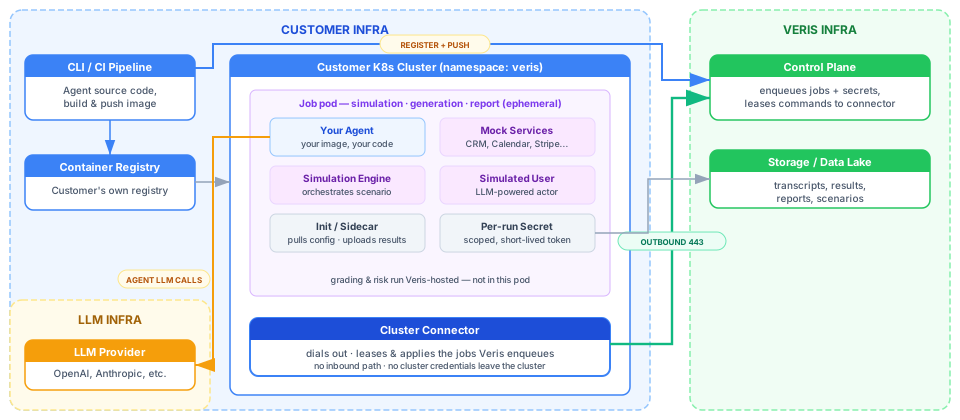
Three things live in your cloud — your Kubernetes cluster, your container registry, and the connector — and Veris orchestrates them over the connector’s connection.
- What runs on your cluster: the connector, plus simulation / scenario-generation / report Jobs that pull your agent image from your registry.
- What stays on Veris: the control plane (orchestration), artifact storage (GCS), and grading / risk (these only read trace data already in Veris storage, so there’s nothing to run on your cluster).
End-to-end, the flow is:
- Provision your cluster + container registry (and grab your org ID + an API key).
veris cluster setup— registers the cluster, provisions the connector, andhelm installs it, in one command.- Verify the connector is
connected. - Build & push your agent image to your registry (
veris env push). - Start runs exactly as on the hosted platform.
What you need to provision
Everything below lives in your cloud. Have these ready before you start.
| # | Resource | Notes |
|---|---|---|
| 1 | Kubernetes cluster (EKS or GKE) | A managed node group / autoscaling node pool sized for Veris jobs — see Node sizing. Plus kubectl access and a namespace (default veris). |
| 2 | Container registry your cluster can pull from | ECR, Artifact Registry, or any private registry. Your nodes must be able to pull from it — see Registry & image pull. |
| 3 | The connector image, pullable by your cluster | Veris publishes it; if your nodes can’t pull it cross-cloud, mirror it into your own registry (one command — see step 4). |
| 4 | Outbound network (HTTPS/443) | To the Veris control plane, the LLM proxy, Veris storage, and your registry — see Network requirements. |
| 5 | Local tooling | kubectl, helm 3.x, docker (with buildx), curl, jq, your cloud CLI (aws / gcloud), and the veris CLI. helm installs the connector; the CLI builds & pushes your agent image. |
| 6 | A Veris org with cluster registration enabled, and an API key | Find your org ID (org_…) and create an API key on your Settings page . One active cluster per org. |
Node sizing
Veris jobs have different resource requirements. Your cluster must have nodes large enough to schedule them. (The connector’s own pod is tiny — ~50m CPU / 64 Mi.)
| Job type | CPU request | Memory request | Memory limit | Minimum node size |
|---|---|---|---|---|
| Scenario generation | 500m | 4 Gi | 16 Gi | 8 Gi+ RAM (e.g., t3.xlarge) |
| Report generation | 500m | 4 Gi | 16 Gi | 8 Gi+ RAM (e.g., t3.xlarge) |
| Simulation | 1000m | 2 Gi | 4 Gi | 4 Gi+ RAM (e.g., t3.large) |
Scenario and report generation are memory-intensive. Nodes with less than 8 Gi allocatable memory (e.g., t3.medium ≈ 3.3 Gi allocatable) will fail to schedule these jobs. Recommended: t3.xlarge (16 Gi) / e2-standard-4 or larger — comfortably runs every job type plus concurrent simulations.
EKS Auto Mode caveat. Prefer a managed node group (or self-managed nodes) over Auto Mode with a self-managed node IAM role — Auto Mode doesn’t reliably attach a custom node role to its instance profile, so the NodeClass sticks at InstanceProfileReady=False and no nodes launch (jobs sit Pending). On GKE, a standard cluster’s autoscaling node pool is the equivalent.
Registry & image pull
Your agent image is pulled by your cluster from your registry, so Veris never needs (or stores) registry credentials. Make sure your nodes can pull:
ECR (AWS)
If your EKS cluster and ECR repo are in the same AWS account, pulls work automatically via the node IAM role (AmazonEC2ContainerRegistryReadOnly / …PullOnly). No extra config. For cross-account ECR, attach imagePullSecrets to the namespace’s default ServiceAccount.
Setup
Point kubectl at your cluster
veris cluster setup installs the connector into your current kubectl context, so select your cluster first:
aws eks update-kubeconfig --name YOUR_CLUSTER --region YOUR_REGION        # EKS
# or: gcloud container clusters get-credentials YOUR_CLUSTER --region YOUR_REGION   # GKE
kubectl config current-context        # confirm it's the right cluster
Set up the cluster connector — one command
veris cluster setup registers the cluster, provisions a connector, and installs it — in one step. (Needs helm, kubectl, and a logged-in CLI: veris login.)
veris cluster setup --name prod \
  --image-registry-url 123456789.dkr.ecr.us-west-2.amazonaws.com
It runs three steps and prints each as it goes:
1/3 Registering the cluster…       ✓ Registered cluster creg_… (namespace: veris).
2/3 Provisioning the connector…    ✓ Provisioned connector conn_… (one-time enrollment token issued).
3/3 Installing the connector…      ✓ Connector installed.
✓ Cluster ready.- Registers the cluster with Veris in connector mode — no API-server URL or credentials, just the name and your
image_registry_url. - Provisions a connector — a one-time enrollment token the connector swaps for a durable credential on first boot.
helm installs the connector into your current context. The chart + image are public (ghcr.io/veris-ai), so they pull anonymously — no registry login.
image_registry_url is the registry prefix Veris uses to build each agent image reference — it appends /<env_id>:<tag>, e.g. 123456789.dkr.ecr.us-west-2.amazonaws.com → …/env_xxx:latest. The image is pulled by your cluster, so Veris never holds your registry credentials. You can leave it off and set it later (PUT /v1/clusters/{id}).
Setup fails fast with a clear message if you’re not logged in, your org isn’t enabled for cluster registration, or helm/kubectl/a kube context is missing — nothing is half-created. Use --no-install to register + provision and just print the helm command, and --org to override the profile’s organization.
Verify the connector is connected
veris cluster connector status
# Status: connected   Version: 0.1.0   Heartbeat: …
Status flips pending → enrolled → connected on the first heartbeat (usually seconds). veris cluster get shows the cluster view; or watch the pod directly:
kubectl logs -n veris -l app.kubernetes.io/instance=veris-connector -f
# Enrolled as connector conn_… → Heartbeat ok: status=connected
Build and push your agent image
With the connector connected, build + push your agent to your registry. veris env push does a local build — layering your .veris/ config onto the Veris base image (pulled with short-lived credentials Veris mints just-in-time) — and pushes to your registry. Your Dockerfile and code never leave your machine.
# From your agent project (with a .veris/ config):
veris env create --name my-agent          # → note the env_id (env_...)
ECR requires the repository to exist before push. The repo name is the part of image_registry_url after the host, ending in your env_id (env_xxx, or veris-images/env_xxx if your prefix includes a path). Your build context must also be complete (e.g., a committed uv.lock if your Dockerfile copies one):
aws ecr create-repository --repository-name env_xxx --region YOUR_REGION
aws ecr get-login-password --region YOUR_REGION | \
  docker login --username AWS --password-stdin YOUR_ACCOUNT.dkr.ecr.YOUR_REGION.amazonaws.com
Artifact Registry auto-creates paths on push; run gcloud auth configure-docker REGION-docker.pkg.dev once.
veris env push # builds <registry>/<env_id>:latest locally and pushes itVeris records the resulting image URI on the environment; at run time it’s baked straight into the Job manifest so the pod pulls it from your registry.
Want to see exactly what setup does, or prefer the raw API? The three steps map to POST /v1/clusters (register), POST /v1/clusters/{id}/connector (returns a one-time enrollment_token + a ready-to-run install_hint), and the helm install from that hint. The chart + image are secret-free and public, so the install pulls anonymously — no imagePullSecret, no credential dance. Air-gapped clusters that can’t reach ghcr.io can mirror the chart + image into their own registry and add --set image.repository=…:
helm pull oci://ghcr.io/veris-ai/veris-connector-chart --version 0.2.0
docker buildx imagetools create -t YOUR_ACCOUNT.dkr.ecr.REGION.amazonaws.com/veris-connector:0.2.0 \
  ghcr.io/veris-ai/veris-connector:0.2.0
Run a simulation
Now use Veris exactly as you would on the hosted platform — start a run from the CLI or console:
veris scenarios create --env-id env_xxx --num 5 --title "smoke test"How a run reaches your cluster
Once the connector is connected, runs dispatch automatically:
- You start a simulation, scenario generation, or report for an environment whose org has this connector-mode cluster.
- The Veris backend builds the Kubernetes Job manifest (with your image URI baked in) and a per-run Secret carrying a short-lived, prefix-scoped storage token and a scoped LLM-proxy key. It enqueues these as commands.
- The connector leases the commands on its next heartbeat, applies the Secret then the Job in your namespace, and acks. An init container pulls config from Veris storage; your agent runs; a sidecar uploads results back.
- The Job writes its outputs and a completion marker to Veris storage, which surfaces results in the Veris UI.
- The connector watches the Jobs it created (label
managed-by=veris-backend) and reports their status — including failure reasons likeImagePullBackOff,Unschedulable, orOOMKilled— back to the control plane, so a failing job surfaces on the owning run or scenario set within a heartbeat interval instead of a generic timeout.
LLM calls from the job route through the Veris LLM proxy using a scoped, revocable per-cluster key — so no provider credentials are stored on your cluster.
Operations
Rotate or upgrade the connector
Issue a fresh enrollment token (revoke + re-provision) in one command. --reinstall also helm uninstalls and reinstalls the connector so the new token takes effect immediately:
veris cluster connector rotate --reinstallWithout --reinstall it rotates the token and prints the helm command for you to run.
Preview note: the durable credential currently persists to an emptyDir, so a pod replacement re-enrolls with the (now-dead) one-time token. Until credential persistence to a Secret lands, rotate whenever you replace the pod (image upgrade, restart) — --reinstall handles the uninstall/reinstall for you. A persistent-credential option will make this a plain rolling update.
Remove
helm uninstall veris-connector -n veris
curl -X DELETE https://sandbox.api.veris.ai/v1/clusters/$CLUSTER_ID \
  -H "Authorization: Bearer $VERIS_API_KEY"
Network requirements
All connections are outbound, HTTPS / 443, from your cluster:
| Destination | Purpose |
|---|---|
sandbox.api.veris.ai | Connector enroll / heartbeat / lease / ack / job-status reports |
llm-proxy.api.veris.ai | LLM calls (agent + Veris-internal generation), via scoped per-cluster key |
storage.googleapis.com | Pull config / scenario data; upload logs and results |
| Your container registry | Pull your agent image + the connector image |
What a job-status report contains (connector ≥ 0.2.0): the Kubernetes Job name, a phase (running / stuck / failed / succeeded), the Kubernetes reason code, and the Kubernetes-provided condition or scheduler message (truncated to 2,000 characters — this may include node names and image URIs). It never contains pod logs, environment values, or Secret contents. Opt out with --set jobWatch.enabled=false (or VERIS_JOB_STATUS_ENABLED=false); failures then surface via timeout-based detection only.
Limitations
- Grading & risk run Veris-hosted (they only read trace data already in Veris storage) — not on your cluster.
- One cluster per organization.
- Supported providers: EKS and GKE. Other distributions may work but aren’t officially supported.
- GCS-based artifacts: all artifacts (scenarios, logs, results) live in Veris-managed GCS buckets.
- Per-run token lifetime (Preview): the scoped storage token isn’t rotated yet — keep jobs within the per-job deadline (generation ≤ 60 min, reports ≤ 35 min). Connector-created secrets aren’t auto-reaped yet either.
- Job failure reasons need connector ≥ 0.2.0: older connectors don’t report job status, so in-cluster failures (image pull, scheduling, OOM) surface only after the platform timeout, without a reason. Upgrade with
veris cluster connector rotate --reinstall.